In the last article we understood the basics of a chess engine. In this article we will explore the most fundamental computation in a chess engines – to evaluate how good or bad a position is and how do I do it in my Foresight engine. We want to be able to attribute a score to every chess position, so that we can find the best move by maximizing the score if it’s White’s move to play or minimize the score if it’s Black’s move to play.
Why does a good evaluation function matter?
By design, our engine will prefer to reach positions as per our evaluation function – eg: if our engine values bishops more than knights then we would try to reach a position where we have more bishops and less knights relative to your opponent.
Another critical use of a good eval function – alpha beta pruning in minimax which is the core of all conventional chess engines work well i.e effectively prune a large number of nodes only when we are able to distinguish between as many types of positions. But we will explore move tree generation and alpha beta pruning at a later time.
What should be the chess position evaluation function as written in the rules of the game?
Simply assign +1 value to position where the white king checkmates black king and -1 for vice versa. For all other positions you can assign a score of 0.
But, but, there is a catch – Practically most positions don’t lead to checkmate and you don’t have enough computing power in the world to compute the route to checkmate in a “quiet” position.
Conventional wisdom of hundreds of years of humans playing chess states that having more pieces generally leads to checkmating the opponent king. Think of it this way – would you rather have more pieces or less than your opponent when starting the game??
Obviously this a gross simplification of the game – since you can checkmate the king even after sacrificing a few pieces to do so.
We will use this assumption to do some feature engineering and
Let’s imagine a simple evaluation function:
function EVALUATION-SIMPLE(board):
    score <- 0

    score <- score + board.getTotalWhitePawns() * 100
    score <- score + board.getTotalWhiteBishops() * 300
    score <- score + board.getTotalWhiteKnights() * 300
    score <- score + board.getTotalWhiteRooks() * 500
    score <- score + board.getTotalWhiteQueen() * 900

    score <- score - board.getTotalBlackPawns() * 100
    score <- score - board.getTotalBlackBishops() * 300
    score <- score - board.getTotalBlackKnights() * 300
    score <- score - board.getTotalBlackRooks() * 500
    score <- score - board.getTotalBlackQueen() * 900

    return score
EVALUATION-SIMPLE() is a simple function which assigns static value to individual pieces on the board. These values are generally used by humans when playing chess, bishops and knights are 3 times as valuable as a pawn, rook is considered 5 times as valuable as a pawn and a queen is considered the most valuable piece with a value of 9 times a pawn.
Consider the following position, our simple evaluation function will give the score as follows: (5 pawns * 100 + 2 bishops * 300 + 2 knights * 300 + 2 rooks * 500 + 1 queen * 900 ) – (7 pawns * 100 + 2 bishops * 300 + 2 bishops * 300 + 2 rooks * 500 + 1 queen * 900) = -200
This means that our simple evaluation function prefers this position for Black and believes that Black is doing well in this position.
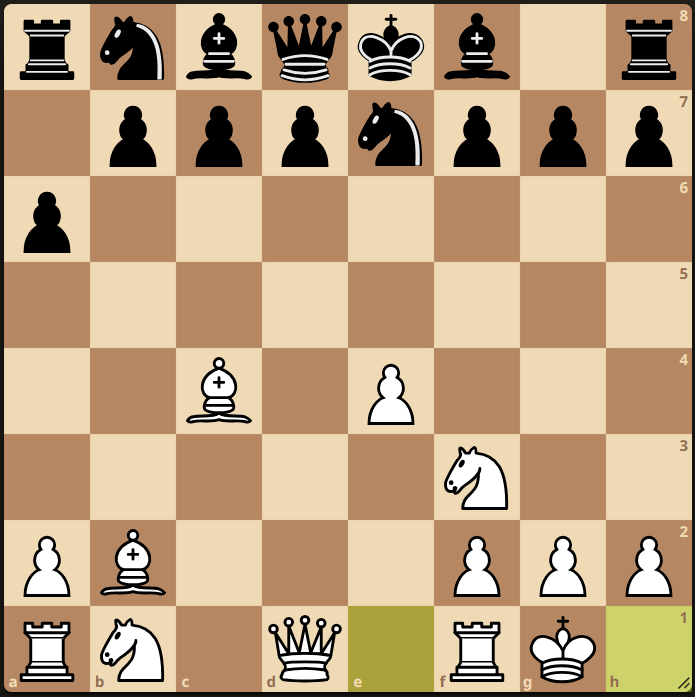
But as we can see in the image above, the white bishops are very powerful and mobile in the long open diagonals, the white king is safe in the corner, white knight on f3 is also well placed. Whereas black pieces are immobile, with no central control, blocked bishops and king still in the center – the black king is primed for an attack by the white pieces.
So even though black is better as per our simple evaluation we know that it is white who is playing for a Win in this position.
This means that we need additional features to be part of our evaluation function like king safety, piece mobility, pawn structure.
Piece Mobility
A knight is a more mobile and active piece in the middle of the board, a bishop is a more active piece when it has open diagonals. A rook becomes more menacing when it stares down open files. In short, active and mobile pieces enhance their quality, mobile pieces enable your position to create attacks on the opposite king or win some of the enemy pieces.
For the purpose of defining a simple mobility metric:
MOBILITY_SCORE(PIECE) = Number of legal moves PIECE can make.
But how do we find the number of legal moves a piece can make, more importantly, how do we do it FAST
To do that we will detour a bit and delve into BITBOARDS.
BITBOARDS:
Bit operations are fundamental operations understood by any CPU (AND, OR, XOR, Left Shift, Right Shift etc) which makes them extremely fast.
Observe, 1101 = 1 * 23 + 1 * 22 + 0 * 21 + 1 * 20 = 13
Here, 13 can used to represent an ordering. It can be an ordering of 4 chairs where 1 means the chair is occupied and 0 means that its empty.
If you want to find the total number of empty chairs, the program would look something like this:
while (number > 0) {
        if number & 1
                count++
        number >>1
}
This is many many times faster than if you represented the chairs as a list of Chair object where each Chair object can have a state of empty or occupied. Your program will internally have to assign memory whenever the Chair object is created and your Garbage Collector in Java will have to release that memory after some time. So if you are planning to do such operations millions of times in a second, then you will need to utilize the bitwise representation.
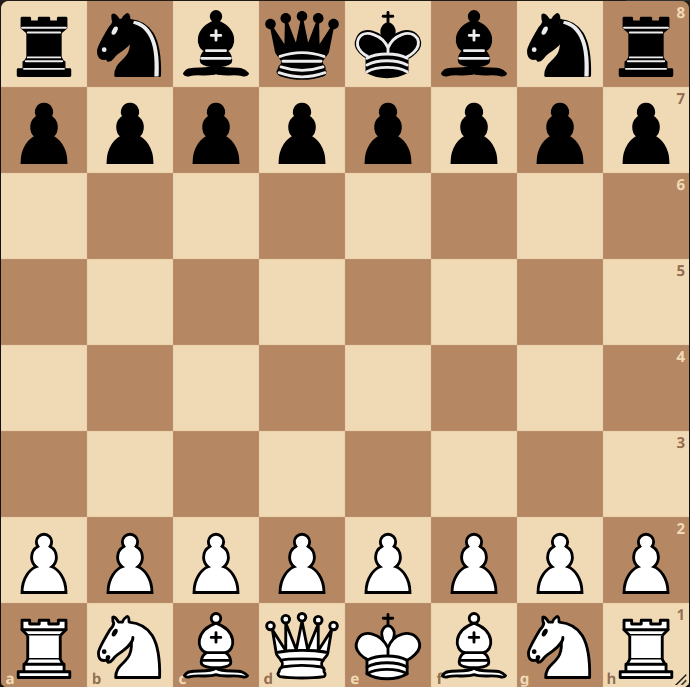
Now, lets see how we can transfer this knowledge into Chess. We will first flatten the 2D chessboard into a 1D 64 bit number as follows:
And of course 1<<x = 2x

Now, we will define such 8×8 layers represented by a 64 bit number for 6 types of white pieces (pawn, rook, bishop, knight, queen, king) and 6 types of black pieces. Which means any chess position can be represented by 12 64-bit numbers.
Now, lets say we need to create a layer which contains all the white pieces:
WHITE-PIECES-LAYER = WHITE-KING-LAYER | WHITE-BISHOP-LAYER |
                     WHITE-KNIGHT-LAYER | WHITE-ROOK-LAYER |
                     WHITE-PAWN-LAYER | WHITE-QUEEN-LAYER
Where | is the bitwise OR operator
Lets generalize how, this flattened representation of a chessboard can be used to traverse the chess board.

Now, that we have some idea about the ease and utility of using bitboards to represent piece wise layers, lets use bitwise operations to find the mobility of the bishop.
In this position, the bishop is situated at 1<<18 position, Bishops can only move diagonally, so our algorithm to find the mobility of the bishop should be such that we keep moving in all four diagonals and add to our mobility count till we are blocked by any piece. And if the blocked piece is the enemy piece, we will add 1 to the mobility count and break the loop since capturing the enemy piece is also a legal move. We will also break the loop if we reach the end of board.
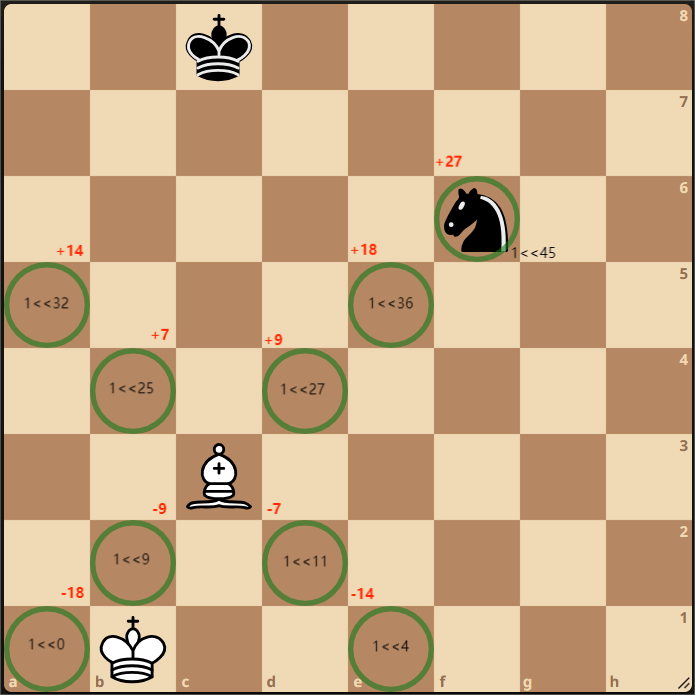
Algorithm for the above stated mechanism:
WHITE-BISHOP-MOBILITY-SCORE(bishop_layer):
  bishop_offset = [-7, -9, 7, 9]
  mobility = 0

  while bishop_layer > 0:
    bishop_layer = bishop_layer & (bishop_layer - 1)
    bishop_position = CountTrailingZeros(bishop_layer)

    for ( offset: bishop_offset ):
      multiplier = 1
      while  0<= bishop_position + multiplier * offset <64:

        if not IsEndOfBoard(bishop_position + multiplier*offset):
          if bishop_position & (whitePieces | blackPieces) == 0:
            mobility++
          elif bishop_position & (whitePieces | blackPieces) != 0:
            mobility++
            break
          else:
            break

    return mobility
You can design similar function for Rook, Queen and Knight mobility with some modifications. You should also look out to pre-compute anything which is repeatedly being evaluated.
Position evaluation time
I will show how long my engine takes to evaluate a single chess position, I will profile it by running the function millions of times.
I ran the position evaluation of a complex chess position 10 million times and here are the results:
| Static Evaluation | Static Evaluation + Piece Mobility | Static Evaluation + Piece Moblility + Pawn Structure + King Safety | |
| Total Time | 8.8 ms | 1768.4 ms | 3609.6 ms |
| Time per position | 0.9 ns | 176.8 ns | 361.0 ns |
As we can see evaluating a position is blazing fast. My evaluation time per position at one time was ~2000 ns which was becoming a bottleneck for my engine.
After some profiling I could see that I was creating an object everytime my position evaluation function got called, since object creation is an expensive operation – you need to allocate a memory for that object and also causes Garbage Collector Backpressure related issues when millions of objects are created.
This object creation itself was taking an average of ~1400-1600 ns. I optimized my program such that I no longer require a new object creation everytime.
I also did a lot of pre-compute which sped-up the mobility calculator function.
You might be thinking that if it takes 361 ns to evaluate a single position, I should be able to evaluate 1e9/361 = 2.77 million positions per second. But in practice I am able to evaluate 0.2-0.5 million positions per second. This is because my program currently has a lot of overhead (A lot of it should be resolved by removing unnecessary object allocation).

 Parv Maurya